
1. Introduction
AI accuracy and compliance have become critical for organizations relying on intelligent systems for decision-making and customer interactions. As models grow more powerful, ensuring they produce reliable, verifiable, and policy-aligned outputs is essential. Accurate, compliant AI protects trust, reduces risk, and supports responsible innovation.
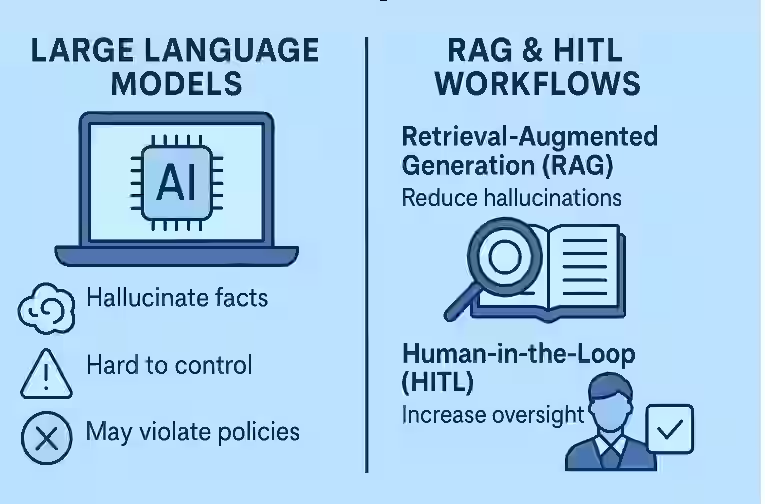
Large language models are powerful, but they have three persistent problems in real-world settings:
- They sometimes “hallucinate” facts.
- They can be hard to control and audit.
- They may accidentally violate policies, regulations, or brand rules.
Retrieval-Augmented Generation (RAG) and human-in-the-loop (HITL) workflows are two complementary approaches designed to address these issues.
RAG reduces hallucinations by letting models look things up in trusted sources (like internal knowledge bases or enterprise search) instead of relying only on parameters “memorized” during training. Human-in-the-loop gives people structured ways to review, correct, and steer the system, especially for high‑risk or high‑value use cases.
When you combine RAG with human oversight, you get systems that are not just smarter, but more reliable, controllable, and compliant with your organization’s requirements.
This article breaks down these ideas in a friendly, practical way and shows how to apply them to your own workflows.
2. Beginner-Friendly Explanation of the Topic
Let’s unpack both pieces first.
What is Retrieval-Augmented Generation (RAG)?
Imagine you’re answering a question. You can:
- rely purely on your memory, or
- quickly search through a trusted knowledge base (books, docs, wiki) and then summarize the answer.
RAG is the second approach for AI.
A RAG system does two main things:
- Retrieves relevant documents or passages from an external knowledge source (like an internal wiki, database, document management system, or the public web).
- Generates an answer using both the user’s question and the retrieved documents as context.
So instead of the model guessing from what it “remembers,” it reads and cites actual content you control.
What is Human-in-the-Loop (HITL)?
Human-in-the-loop is a design pattern where people remain involved at key points in the AI workflow. They don’t read every token (that wouldn’t scale), but they:
- review outputs in high-risk scenarios,
- correct or veto questionable responses,
- label data for training or evaluation,
- configure rules and guardrails,
- approve or reject actions (like sending emails, filing tickets, or publishing content).
Think of AI as a very capable assistant, and HITL as the manager who supervises and signs off on important work.
RAG + HITL Together
Combining them means:
- The model answers based on your data (through retrieval).
- Humans supervise where it matters, catching errors, enforcing policies, and continuously improving the system.
This pairing is especially powerful in domains where wrong answers can be costly: healthcare, finance, legal, security, regulated industries, or public-facing content.
3. Why the Topic Matters
3.1 Reducing Hallucinations
Large models can sound confident even when they’re wrong. If they only use their own parameters, they may fabricate citations, misstate policies, or invent product details.
RAG mitigates this by:
- grounding answers in retrieved documents, and
- enabling responses like: “According to section 4.3 of the policy…” instead of pure speculation.
Human reviewers can then quickly check whether:
- the cited passages actually support the answer, and
- anything sensitive or off-brand has slipped through.
3.2 Increasing Control
Organizations want to control:
- which data a model can see,
- which sources are trusted,
- how strictly policies are enforced,
- what style or tone responses use.
RAG helps by letting you define and curate the knowledge base: internal docs, whitelisted web sources, legal templates, product manuals, etc. The model is steered toward those sources instead of the open internet or its own guesses.
Human-in-the-loop adds another layer: people can set rules, review edge cases, and shape how the system behaves over time in production environments.
3.3 Enabling Compliance and Auditability
For compliance, it’s not enough to be mostly correct. You often need:
- traceability (where did this answer come from?),
- consistent application of rules,
- the ability to show auditors your process and controls.
RAG supports this by:
- attaching citations or passages for each answer,
- allowing you to log which documents were retrieved and used.
Human reviewers add:
- approval workflows,
- escalation paths,
- human-signed records for critical decisions.
Together, they form a more defensible AI system.
.… Learn more AI & Privacy Risk
4. Core Concepts (3–6 Key Ideas)
4.1 Retrieval Pipelines
The retrieval part of RAG is usually a multi-step pipeline:
- Indexing – You ingest your documents (PDFs, wiki pages, tickets, policies) and store them in a searchable index, often a vector database that supports semantic search and dense embeddings.
- Querying – Given a user question, you convert it into a vector and fetch the most relevant passages or documents.
- Filtering – You may filter by:
- user permissions,
- document type (e.g., “only policies, not raw logs”),
- recency or version.
The quality of retrieval heavily influences accuracy. If you fetch poor or irrelevant content, the generation step has little chance to be right.
4.2 Generation with Context
Once you have retrieved passages, you feed them to the model along with the question. The model then:
- reads the context,
- identifies relevant parts,
- produces a synthesized answer.
There are many variants (e.g., different ways of mixing multiple passages or chunking documents), but the core idea is: generation grounded in retrieved context.
4.3 Human Review Loops
Human-in-the-loop can appear at several layers:
- Pre-deployment – humans test the system, label outputs, refine prompts, and tune retrieval filters.
- In-production gating – certain flows require human approval:
- sending emails to customers,
- submitting regulatory filings,
- publishing external articles.
- Post-hoc review – humans periodically review a sample of outputs, score them, and feed back corrections.
These loops help catch systematic issues and improve both retrieval and generation.
4.4 Policy and Guardrails
Beyond general correctness, you often need policy adherence:
- privacy rules (no leaking PII),
- legal limitations (no giving certain kinds of advice),
- brand and tone guidelines,
- banned topics or phrases.
You can enforce guardrails by:
- constraining the retrieval corpus (e.g., no sensitive docs),
- adding pre- and post-processing checks,
- requiring human review when specified risk signals are triggered (e.g., “mentions of medical conditions”).
4.5 Feedback and Continuous Learning
Human feedback is not only for blocking bad outputs. It’s also fuel for improvement in an AI governance framework.
Feedback loops might:
- mark certain retrieved documents as irrelevant (to tune retrieval),
- correct model answers (to finetune prompts or models),
- update policies and instructions based on real-world edge cases.
RAG + HITL systems are not static; they evolve as your organization and data evolve.
5. Step-by-Step Example Workflow
Let’s walk through a concrete scenario: an internal “policy assistant” for a mid-sized company.
Step 1: Build the Knowledge Base
You gather:
- HR policies,
- security policies,
- code of conduct,
- benefits guides,
- onboarding documents.
You chunk these documents into small sections (e.g., 200–500 words) and index them in a vector database with semantic search.
Step 2: Set Permissions and Filters
You define:
- which teams can see which documents,
- what content is considered sensitive (e.g., draft policies, legal memos),
- filters (e.g., “only final, approved documents” for end users).
This ensures retrieval never surfaces data that users shouldn’t see.
Step 3: Configure the RAG Pipeline
The pipeline for a user question might be:
- User asks: “How many days of parental leave do I get in Germany?”
- System converts the question into a vector and queries the index.
- It retrieves relevant passages from:
- “Global Leave Policy v3” and
- “Germany Local Benefits Addendum”.
- It filters out anything not tagged as current or approved.
- It sends the question + retrieved passages to the model.
The model then generates an answer referencing those documents, ideally with citations (e.g., “According to the Germany Local Benefits Addendum, section 2.1…”).
Step 4: Human-in-the-Loop Gating for High-Risk Topics
You define rules:
- Queries involving legal disputes, terminations, whistleblowing, or accommodations trigger a human review.
- For these topics, the system:
- drafts an answer,
- attaches the supporting passages,
- sends it to the HR legal team before the employee sees it.
A human reviewer:
- checks that the answer is correct,
- adjusts wording if necessary,
- ensures no confidential or speculative information is included.
Only then is the response sent to the employee.
Step 5: Collect Feedback and Improve
Over time:
- Employees can rate answers: “helpful / not helpful.”
- HR reviewers can tag issues: “outdated policy,” “confusing wording,” “wrong jurisdiction.”
You then:
- remove or update outdated documents,
- retrain or adjust retrieval to prioritize newer or higher-quality sources,
- update prompts to clarify how the model should handle uncertain cases (e.g., “If you’re unsure or the policy is ambiguous, ask the user to contact HR directly.”).
With each iteration, accuracy, control, and compliance improve.
6. Real-World Use Cases
6.1 Customer Support
RAG:
- pulls from knowledge bases, FAQs, and ticket history,
- generates tailored answers to customer questions.
Human-in-the-loop:
- supervises replies for VIP customers,
- reviews responses in regulated sectors (e.g., financial advice, medical information),
- audits a sample of interactions weekly for quality and compliance.
Result: faster responses with fewer incorrect or risky statements and better AI-powered customer support.
6.2 Legal and Compliance Teams
RAG can:
- search across case law, internal templates, past decisions, and compliance manuals,
- suggest clauses or summarize relevant precedents as part of a legal AI assistant.
Human-in-the-loop:
- lawyers and compliance officers always review drafts before they are used,
- they correct misinterpretations and update the corpus with new regulations.
Result: more efficient research and drafting, but with human experts retaining final authority.
6.3 Healthcare and Life Sciences
RAG can retrieve:
- clinical guidelines,
- internal standard operating procedures (SOPs),
- drug information databases.
Human-in-the-loop:
- clinicians or pharmacists review AI-generated summaries or patient education materials,
- the system is constrained to cite only approved medical sources,
- any mention of diagnosis or treatment recommendations goes to a clinician for review.
Result: better access to up-to-date information while adhering to strict safety and regulatory requirements.
6.4 Enterprise Search and Assistant Tools
Employees often waste time hunting through wikis, shared drives, and chats.
RAG:
- offers a unified enterprise search interface that summarizes answers from multiple internal sources.
Human-in-the-loop:
- domain experts curate the corpus,
- security teams define access controls,
- managers review outputs in sensitive domains (e.g., security incidents, financial data).
Result: more productive employees and less duplication of effort, without giving up control over sensitive information.
7. Best Practices
-
Curate your knowledge base carefully.
Better documents lead to better answers. Deduplicate, clean, and tag your content. -
Implement strong access control.
Retrieval should respect permissions. Do not rely solely on the model to hide sensitive data. -
Always show or log sources.
Provide citations or links to the retrieved passages. This supports both user trust and internal audits. -
Define clear HITL triggers.
Identify categories (topics, user types, actions) that always require human review: legal, medical, financial, minors, public announcements, etc. -
Use conservative behaviors for uncertainty.
Instruct models to defer: “I’m not able to answer this. Please contact [team]” when the retrieved context is weak or missing. -
Monitor and iterate.
Collect feedback, track error types, and update both the corpus and prompts regularly. -
Document your governance.
Keep written records of:- data sources,
- review processes,
- escalation paths.
This helps with internal alignment and external audits.
8. Common Mistakes
-
Assuming RAG automatically solves hallucinations.
If retrieval pulls in irrelevant or poor-quality documents, the model can still hallucinate or misinterpret. Retrieval quality matters. -
Treating HITL as an afterthought.
Adding humans only after a problem arises leads to ad-hoc, inconsistent oversight. Design HITL from the start. -
Indexing everything with no structure.
Dumping all documents into a vector store without tagging, filtering, or versioning makes it hard to control and hard to debug. -
Over-automating high-risk decisions.
Letting AI send out legal notices, regulatory reports, or clinical recommendations without human review is dangerous and often non-compliant. -
Ignoring change management.
Policies, products, and laws change. If your corpus and prompts are not updated, your answers will drift out of date. -
Not training reviewers.
Human reviewers need guidance:- what to look for,
- how to flag issues,
- how to provide structured feedback.
Untrained reviewers may rubber-stamp outputs or give inconsistent feedback.
9. Summary / Final Thoughts
RAG and human-in-the-loop are two foundational building blocks for practical AI systems:
- RAG grounds answers in real, controllable data sources and greatly reduces the reliance on the model’s internal memory.
- Human-in-the-loop ensures that people remain in charge of important decisions, enforcing accuracy, policy compliance, and organizational norms.
When you combine them, you can build assistants, search tools, and decision-support systems that are not only powerful but also trustworthy and auditable.
The key is to think in systems, not just models:
- design the retrieval pipeline,
- curate your knowledge base,
- define review workflows and governance,
- and continuously improve based on feedback.
Done well, RAG + HITL can move AI from impressive demos to reliable, everyday tools in your organization.
10. FAQs
1. Does RAG completely eliminate hallucinations?
No. RAG significantly reduces hallucinations by grounding answers in retrieved documents, but it does not guarantee perfection. If retrieval is weak or the documents are ambiguous, the model can still misinterpret or invent details. That’s why monitoring and, for critical use cases, human review remain important.
2. Do I always need a human in the loop for RAG systems?
Not always. For low-risk, internal use cases (like simple document search), you might use RAG fully automatically. However, for regulated domains, public communications, or decisions with legal consequences, it is wise to include human review at least for certain categories of queries or actions.
3. How is RAG different from fine-tuning a model on my data?
Fine-tuning changes the model’s parameters so it can better imitate patterns in your data. RAG, instead, retrieves your data at query time and uses it as context. RAG is usually easier to update (just change the corpus), provides better traceability, and reduces the risk of memorizing sensitive information compared with heavy fine-tuning.
4. What kind of data works best for RAG?
Structured, well-written documents are ideal: policies, manuals, FAQs, technical docs, SOPs, and knowledge base articles. You can also use emails, tickets, or chats, but they often require more cleaning and chunking to be useful.
5. How do I decide when to trigger human review?
Common triggers include:
- specific topics (legal, medical, financial),
- sensitive user groups (minors, at-risk individuals),
- high-impact actions (sending to many users, publishing externally),
- low-confidence retrieval (few or irrelevant documents returned).
Start with conservative rules and relax them only once you have strong evidence that the system behaves reliably.
6. Is human-in-the-loop scalable?
Yes, if designed well. You don’t need humans to review everything. Instead:
- auto-approve low-risk outputs,
- sample and spot-check a percentage,
- fully review only high-risk categories.
This way, a relatively small team can oversee a large volume of AI activity.
7. How do we ensure compliance with data privacy rules?
Combine technical and process measures:
- restrict the corpus to approved, non-sensitive documents,
- enforce access controls and logging on your retrieval system,
- avoid indexing raw PII unless strictly necessary and legally allowed,
- include legal and security teams in the design and review of the system.
8. Can RAG be used with different types of models?
Yes. RAG is a pattern, not a single model. You can use it with:
- general-purpose large language models,
- domain-specific models,
- open-source or proprietary systems.
The crucial part is building a robust retrieval pipeline and passing the retrieved context into the model.
9. How do we measure whether RAG + HITL is working?
Track a mix of metrics:
- answer quality (accuracy, helpfulness),
- retrieval quality (relevance of documents),
- compliance incidents or policy violations,
- time saved for end users,
- review workload for humans.
Compare performance over time as you refine your corpus, prompts, and review processes.
10. What is the first step if my organization wants to adopt RAG + HITL?
Start small. Pick a focused use case (e.g., internal policy assistant or product FAQ helper). Build:
- a clean, limited corpus,
- a simple RAG pipeline,
- clear human review rules for high-risk queries.
Pilot it with a small group, gather feedback, and iterate before expanding to more complex or sensitive domains.
Pingback: How RAG Actually Works: A Beginner-Friendly Guide | %