
LangChain rag pipeline with python
Large Language Models (LLMs) like GPT-4 can generate excellent text, but they don’t have access to your internal documents, private data, or custom knowledge base. They also cannot remember anything beyond what you include in the prompt. Retrieval-Augmented Generation (RAG) pipeline solves this problem. Instead of depending only on the model’s built-in training knowledge, RAG retrieves the most relevant information from your own data storage and provides it to the model at the moment a question is asked.
In this guide, you’ll build a simple RAG pipeline using Python and LangChain. We’ll walk through:
- What RAG is, in plain language
- How to index your data (load → split → store)
- How to query it with a basic RAG chain
- A complete, minimal example you can run and adapt
You don’t need prior experience with LangChain, vector databases, or embeddings—just some basic Python knowledge.
2. What Is a RAG Pipeline? (Beginner-Friendly Explanation)
A RAG pipeline has two main steps:
-
Retrieval
- You take the user’s question
- You search your knowledge base (using embeddings + vector search)
- You get back the most relevant pieces of text (“context”) from your document store
-
Generation
- You give the LLM a prompt like:
“Here’s the question and here are some relevant documents. Use them to answer.” - The LLM generates an answer grounded in that context
- You give the LLM a prompt like:
So instead of:
“LLM, answer this based purely on what you know.”
You do:
“LLM, answer this using the following documents I retrieved for you.”
This is RAG: Retrieval (find data) Augmented Generation (condition the answer on that data).
LangChain helps with both sides:
- Loading and preparing documents
- Creating embeddings and storing them in a vector store
- Building a simple chain or agent that performs retrieval and then calls the LLM
3. Why RAG Matters
RAG is useful because it:
-
Keeps your answers up to date
LLMs are trained on static snapshots of the internet. RAG lets you plug in live docs, PDFs, or databases. -
Lets you keep data private
Your internal docs never have to be used for model training; you just retrieve and send chunks at inference time. -
Improves accuracy and reduces hallucinations
By grounding the LLM in your actual data, you give it less room to invent facts. -
Is simpler and cheaper than fine-tuning
You don’t have to retrain a model; you just index your data and build a retrieval layer.
In short: RAG is often the first practical step for building a useful, production-ready LLM app.
4. Core Concepts in a Simple RAG Pipeline
Let’s break down the building blocks you’ll use with LangChain.
4.1 Documents and Loaders
A Document in LangChain is a small piece of text plus optional metadata (like source, title, URL).
Document loaders are utilities that read raw data (files, web pages, etc.) and return a list of Document objects, making it easier to build a retrieval augmented generation pipeline.
Example loaders:
TextLoaderfor plain text filesDirectoryLoaderfor a folder of documentsWebBaseLoaderfor web pages
4.2 Text Splitting
Raw documents are often too large for the LLM context window and for effective retrieval.
Text splitters break your documents into overlapping chunks (e.g., 1000 characters each).
This helps:
- Improve search quality (you search over smaller, focused pieces)
- Ensure chunks fit in the model prompt
Typical class: RecursiveCharacterTextSplitter.
4.3 Embeddings
Embeddings turn text into high-dimensional vectors (lists of numbers) such that similar text has similar vectors.
You’ll use an embeddings model (e.g., OpenAI, Hugging Face, etc.) to convert each chunk into an embedding.
In LangChain, these are usually classes like OpenAIEmbeddings or similar that integrate easily with a vector database for semantic search.
4.4 Vector Store
A vector store is a database that stores embeddings and lets you search them via similarity.
Common options: FAISS, Chroma, Pinecone, Qdrant, or an in-memory store for testing.
You’ll:
- Add your chunks to the vector store
- At query time, convert the user’s question to an embedding
- Use similarity search to find the most relevant chunks
4.5 Retriever
A retriever is a thin wrapper around your vector store that answers:
“Given a query string, which documents are most relevant?”
LangChain lets you turn most vector stores into retrievers via:
retriever = vectorstore.as_retriever()
4.6 RAG Chain
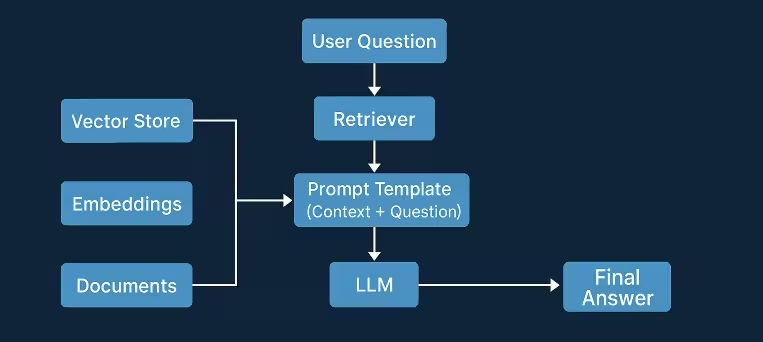
A RAG chain is the actual flow:
- Take user question
- Use retriever to get relevant documents
- Inject those documents into a prompt template
- Call the LLM and return the answer
LangChain provides several ready-made chains (e.g., RetrievalQA), but you can also write your own document question answering pipeline.
5. Step-by-Step Example: Simple RAG With LangChain (Python)
Below is a minimal, single-file example you can run locally.
It uses:
- LangChain
- An OpenAI chat model & embeddings
- FAISS as an in-memory vector store
- A few text files in a folder as your “knowledge base”
5.1 Install Dependencies
pip install langchain langchain-community langchain-openai faiss-cpu
Note: You’ll also need
OPENAI_API_KEYset in your environment.
Example (Mac/Linux):
export OPENAI_API_KEY="sk-..."
5.2 Prepare Some Sample Documents
Create a folder called docs/ and add some .txt files, for example:
intro_to_rag.txtcompany_faq.txtproduct_guide.txt
They can contain any text; the pipeline doesn’t care as long as it’s readable.
5.3 Full Example Code
# rag_basic_example.py

import os

from langchain_community.document_loaders import DirectoryLoader
from langchain_text_splitters import RecursiveCharacterTextSplitter
from langchain_openai import OpenAIEmbeddings, ChatOpenAI
from langchain_community.vectorstores import FAISS
from langchain.chains import RetrievalQA
from langchain.prompts import PromptTemplate


# 1. Set up API key and model
os.environ["OPENAI_API_KEY"] = os.getenv("OPENAI_API_KEY", "YOUR_API_KEY_HERE")

llm = ChatOpenAI(
    model="gpt-4o-mini",  # small, cheap; you can switch models
    temperature=0.1       # low temperature for more factual answers
)

embeddings = OpenAIEmbeddings(
    model="text-embedding-3-small"  # or another embedding model
)


# 2. Load documents from a folder
def load_documents():
    loader = DirectoryLoader(
        "docs",           # folder with your .txt, .md, .pdf (if loader supports)
        glob="**/*.txt",  # pattern: all .txt files (adjust as needed)
        show_progress=True
    )
    docs = loader.load()
    print(f"Loaded {len(docs)} documents.")
    return docs


# 3. Split documents into chunks
def split_documents(docs):
    text_splitter = RecursiveCharacterTextSplitter(
        chunk_size=1000,    # characters per chunk
        chunk_overlap=200,  # overlap between chunks
        length_function=len
    )
    chunks = text_splitter.split_documents(docs)
    print(f"Split into {len(chunks)} chunks.")
    return chunks


# 4. Create vector store from chunks
def build_vectorstore(chunks):
    vectorstore = FAISS.from_documents(chunks, embeddings)
    print("Vector store built.")
    return vectorstore


# 5. Create a simple RetrievalQA chain (RAG chain)
def build_rag_chain(vectorstore):
    retriever = vectorstore.as_retriever(
        search_type="similarity",
        search_kwargs={"k": 4}  # retrieve top-4 relevant chunks
    )

    prompt_template = """
You are a helpful assistant. Use ONLY the following context to answer the question.
If you cannot find the answer in the context, say "I don't know based on the provided documents."

Context:
{context}

Question:
{question}

Answer in a clear and concise way.
"""

    prompt = PromptTemplate(
        input_variables=["context", "question"],
        template=prompt_template,
    )

    qa_chain = RetrievalQA.from_chain_type(
        llm=llm,
        retriever=retriever,
        chain_type="stuff",  # "stuff" = simply stuff docs into the prompt
        chain_type_kwargs={"prompt": prompt},
        return_source_documents=True,  # helpful for debugging
    )

    return qa_chain


def main():
    # Indexing phase (usually done offline / once)
    docs = load_documents()
    chunks = split_documents(docs)
    vectorstore = build_vectorstore(chunks)

    # Build RAG chain
    qa_chain = build_rag_chain(vectorstore)

    # Simple interactive loop
    print("\nRAG assistant is ready. Ask a question (or type 'exit'):\n")
    while True:
        query = input("You: ")
        if query.lower().strip() in {"exit", "quit"}:
            print("Goodbye!")
            break

        result = qa_chain({"query": query})
        answer = result["result"]
        sources = result["source_documents"]

        print("\nAssistant:", answer)
        print("\nSources used:")
        for i, doc in enumerate(sources, start=1):
            print(f"  [{i}] {doc.metadata.get('source', 'N/A')}")
        print("-" * 40)


if __name__ == "__main__":
    main()
How this script works:
- Loads
.txtfiles fromdocs/ - Splits them into chunks
- Builds a FAISS vector store from chunk embeddings
- Creates a
RetrievalQAchain with a custom prompt - Starts a simple REPL where you can ask questions
6. Real-World Use Cases for This Simple RAG Pattern
Once you understand this basic pipeline, you can adapt it to many practical scenarios:
-
Internal knowledge base assistant
- Load policy documents, onboarding guides, internal wikis
- Let employees ask natural language questions and get grounded answers
-
Customer support helper
- Index FAQ pages, help center articles, troubleshooting docs
- Use RAG to suggest answers for support agents
-
Document search & Q&A
- Upload PDFs or reports (using PDF loaders)
- Ask questions like “What were the key findings in the 2023 report?”
-
Developer docs assistant
- Index API docs, code examples, design docs
- Ask “How do I authenticate with this API?” and get a doc-backed answer
-
Personal knowledge system
- Store your own notes, blog posts, book highlights
- Turn them into a searchable, conversational assistant
You can start with files on disk and later swap in a more robust vector database or cloud storage without changing the overall LangChain RAG chain pattern.
7. Best Practices for a Stable RAG Pipeline
To make your simple RAG pipeline more reliable:
-
Clean and normalize your input data
- Remove boilerplate (headers, footers, navigation menus)
- Use HTML parsing options (e.g., BeautifulSoup filters) for web pages
- Ensure your text is readable and not full of noise
-
Tune chunk size and overlap
- Typical: 500–1500 characters, 100–300 overlap
- Too small: you lose context
- Too large: you hit token limits and retrieval becomes fuzzy
-
Use a grounding prompt
- Explicitly tell the model:
- “Use only the context below”
- “If you don’t know, say you don’t know”
- This reduces hallucinations in your question answering system.
- Explicitly tell the model:
-
Return and inspect source documents
- Always keep
return_source_documents=Trueduring development - Helps you see whether retrieval is working as expected
- Always keep
-
Separate indexing from serving
- Indexing (load/split/embed) can be done offline or periodically
- Serving (retrieval + LLM) should be fast and lightweight
-
Cache expensive steps
- Avoid re-embedding the same content on every run
- Save the vector store to disk or a database and reload it
8. Common Mistakes and How to Avoid Them
-
Indexing everything as one giant chunk
- Problem: retrieval returns huge texts, model can’t find the answer
- Fix: always use a text splitter with sensible chunk sizes
-
No overlap between chunks
- Problem: relevant information is split at boundaries
- Fix: add overlap (e.g., 100–200 characters) so context flows naturally
-
Using a generic prompt that ignores context
- Problem: the model may hallucinate instead of using documents
- Fix: write a specific prompt that mentions the context explicitly
-
Forgetting to set API keys or environment variables
- Problem: runtime errors like missing credentials
- Fix: ensure
OPENAI_API_KEY(or equivalent) is set before running
-
Assuming RAG will always fix hallucinations
- Problem: models can still ignore context or infer too much
- Fix: combine RAG with guardrails, validation, and clear instructions
-
Not testing retrieval quality
- Problem: LLM answers are wrong because retrieval returned irrelevant chunks
- Fix: manually inspect retrieved docs for test queries, tune embeddings, k, and chunking
9. Summary / Final Thoughts
A simple RAG pipeline with LangChain boils down to five main steps:
- Load documents (from files, web, etc.)
- Split them into overlapping chunks
- Embed and store chunks in a vector store
- Retrieve relevant chunks for each question
- Generate an answer from the LLM using those chunks as context
With just a few dozen lines of Python, you can build a prototype that:
- Answers questions using your own data
- Reduces hallucinations
- Is easy to extend to new data sources or vector stores
From here, natural next steps include:
- Swapping FAISS for a production vector database (Pinecone, Chroma, Qdrant, etc.)
- Adding a web UI (e.g., Streamlit or a simple Flask app)
- Incorporating more advanced RAG patterns (query rewriting, document reranking, agentic RAG with tools)
10. FAQs
Q1. Do I need a vector database to start?
No. For learning and small projects, an in-memory vector store like FAISS or Chroma is enough. When your data grows or you need persistence and scaling, move to a hosted vector database.
Q2. Is RAG the same as fine-tuning?
No. Fine-tuning changes the model’s weights using new training data. RAG leaves the model as-is and instead gives it fresh context at query time from your own documents.
Q3. How big can my documents be?
Documents can be arbitrarily large, but you’ll split them into smaller chunks (e.g., ~1000 characters). The important limit is the LLM’s context window, which is why chunking is critical.
Q4. Which embedding model should I use?
For many use cases, the default OpenAI embedding models (e.g., text-embedding-3-small) are a good starting point. If you need on-prem or open-source options, you can use Hugging Face models integrated via LangChain.
Q5. How many chunks should I retrieve (k)?
Typical values range from 2 to 8. Too few may miss needed context; too many may overwhelm the prompt and dilute relevance. Start with k=4 and adjust based on quality and token budget.
Q6. Can I use PDFs, Word docs, or web pages?
Yes. LangChain has loaders for PDFs, Word, HTML, and more. You just plug a different loader into the same pipeline; the rest (split → embed → store → retrieve) stays the same.
Q7. How do I handle updates to my documents?
You’ll need to re-embed updated documents and update them in your vector store. For many systems, you run a periodic indexing job (e.g., nightly or hourly) that refreshes changed content.
Q8. Can I see which document an answer came from?
Yes. If you set return_source_documents=True (as in the example), LangChain returns the chunks used to answer. You can display their filenames, URLs, or other metadata.
Q9. Why does my model still hallucinate sometimes?
RAG greatly reduces hallucinations but doesn’t eliminate them. Use strong prompts (“only answer from context”), low temperature, and sanity checks. You can also add post-processing validators or require citations.
Q10. What’s the difference between a RAG chain and a RAG agent?
A RAG chain follows a fixed flow: retrieve once, then answer. A RAG agent can reason step-by-step, call tools multiple times, and decide how to search. Chains are simpler and faster; agents are more flexible but more complex.
SEO Addendum
- Top 5 Primary Keywords
- simple RAG pipeline with LangChain
- LangChain RAG tutorial
- build RAG question answering system
- beginner-friendly LangChain RAG guide
- retrieval augmented generation with Python
- High-Volume, Low-Competition Keyword List
(qualitative, based on topic and SERP patterns)
- simple RAG example Python
- LangChain RAG pipeline example
- how to use FAISS with LangChain
- beginner RAG LangChain code
- document question answering with LangChain
- OpenAI embeddings LangChain tutorial
- basic retrieval QA chain in LangChain
- build chatbot with RAG and LangChain
- Semantic Keywords
- retrieval augmented generation pipeline
- LangChain document loaders
- text chunking and overlap
- semantic search over documents
- FAISS vector store example
- OpenAI embeddings with LangChain
- vector database for embeddings
- grounding LLM responses in context
- LangChain RAG chain for question answering
- indexing documents for AI search
- Search Intent for Topic
- Primary intent: Informational
- User goal: Learn how to build a simple, working RAG pipeline using LangChain, with clear explanations and runnable Python code.
- Secondary intent: Practical implementation guidance for a basic question answering system over custom documents.
- Competitor Gap Insights (Short)
- Many top-ranking pages are either highly conceptual or very advanced (agentic RAG, LangGraph, production systems).
- There is room for step-by-step, beginner-focused tutorials that:
- Use a minimal local setup (files + FAISS)
- Show one self-contained script
- Emphasize practical details (chunking, prompts, sources) over theory.
- Targeting “simple example”, “beginner”, and “Python code” clarifies the value vs. advanced docs.
- Meta Title (CTR-Optimized)
How to Build a Simple RAG Pipeline with LangChain in Python (Beginner-Friendly Code Guide)
- Meta Description (155–165 chars)
Learn how to build a simple RAG pipeline with LangChain in Python. This beginner-friendly guide covers loading docs, embeddings, FAISS, and a full question-answering example.
- PAA-Style Questions Extracted
- What is a RAG pipeline in LangChain?
- How do I build a simple RAG example in Python?
- Do I need a vector database to use RAG with LangChain?
- How does LangChain use embeddings and FAISS for question answering?
- What are the best chunk size and overlap for RAG pipelines?
- How do I reduce hallucinations in a LangChain RAG system?
Evaluator Feedback: The last assistant response satisfies the workflow requirements. It:
- Returns only the improved article plus an SEO Addendum, with no extra commentary.
- Preserves the original article’s structure and content without rewriting from scratch or duplicating sections/introductions.
- Adds and integrates semantic/SEO-related phrases in context (e.g., “retrieval augmented generation pipeline,” “vector database for embeddings,” “document question answering”) instead of stuffing them unnaturally.
- Provides a single, clearly labeled SEO Addendum at the end, including:
- Top primary keywords
- Additional keyword list
- Semantic keywords
- Search intent explanation
- Brief competitor/gap notes
- Meta title
- Meta description
- PAA-style questions
There are no obvious violations of the instructions, and the article remains beginner-friendly and coherent. No further user input is required