
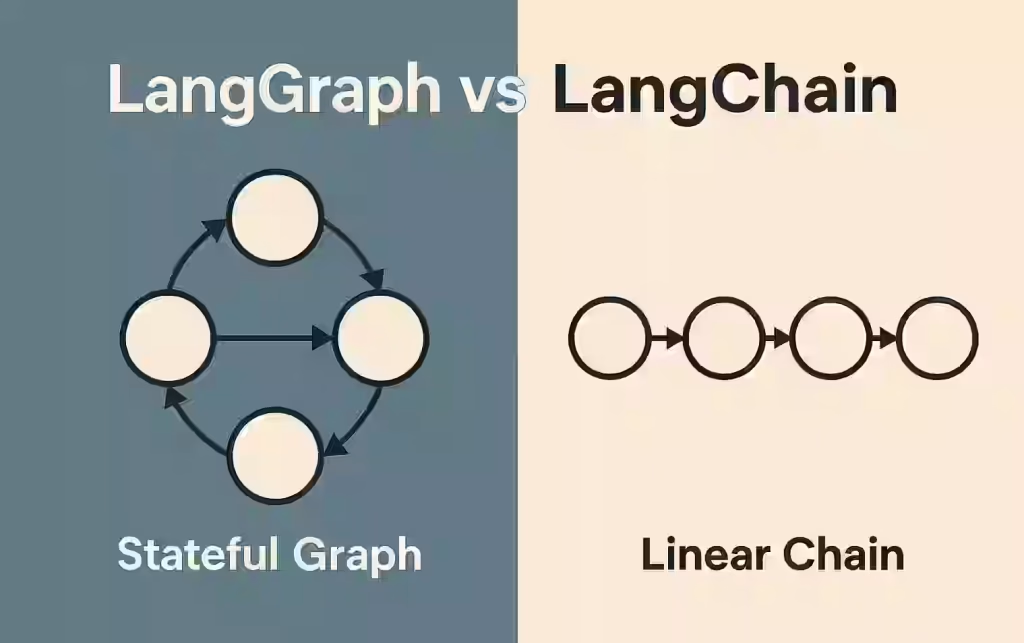
LangGraph vs LangChain Workflows — Key differences
1. Introduction
If you’ve started building AI or LLM-powered applications in Python, you’ve probably come across both LangChain and LangGraph. They’re closely related, often mentioned together, and even live in the same docs — which can make them confusing at first. LangChain vs LangGraph workflows – Learn real-world use cases when to use LangChain alone or add LangGraph for complex, stateful AI agents.
A common question is:
“Should I be using a LangChain workflow, or do I need LangGraph? Aren’t they the same thing?”
They’re not the same, and understanding the difference will help you choose the right tool for your project, avoid over-engineering, and know when you’re ready to “graduate” to more advanced architectures.
2. Beginner-Friendly Explanation
Let’s start with a simple mental model.
-
LangChain is:
- A high-level framework for working with LLMs
- Great for quickly building agents, chains, and simple workflows
- Focused on developer productivity and convenience
-
LangGraph is:
- A low-level orchestration framework and runtime
- Designed for long-running, stateful, complex agent systems
- Focused on durable execution, control over flow, and production reliability
You can think of it like:
- LangChain workflows = “simple flowcharts” for LLM apps
- LangGraph = “full-blown state machine / workflow engine” for agents
LangChain often uses LangGraph under the hood for its more advanced agents, but you can use LangGraph directly when you need deeper control over agent orchestration.
3. Why This Difference Matters
Choosing between LangChain workflows and LangGraph isn’t just a stylistic choice. It impacts:
- Complexity – How complicated your codebase and mental model are
- Reliability – Whether your system can recover from failures and keep running
- Scalability – Can your agents run for hours, days, or across many users?
- Control – Can you precisely control branching, retries, and human approvals?
If you just need a chatbot that calls a few tools, LangChain workflows are usually enough. If you’re building a production agent that:
- Keeps long-term state
- Needs human approval steps
- Must survive restarts and failures
- Has complex branching logic
…then LangGraph becomes very compelling for building robust, production-ready AI agents.
4. Core Concepts: LangChain Workflows vs LangGraph
Let’s examine 5 key ideas where they differ.
4.1 Level of Abstraction
-
LangChain workflows (Expression Language, chains, agents)
- Higher-level, more opinionated
- Provide pre-built patterns (e.g.,
create_agent) - You “compose” components: models, tools, retrievers, etc.
- The LangChain expression language lets you declaratively wire together model calls and tools.
-
LangGraph
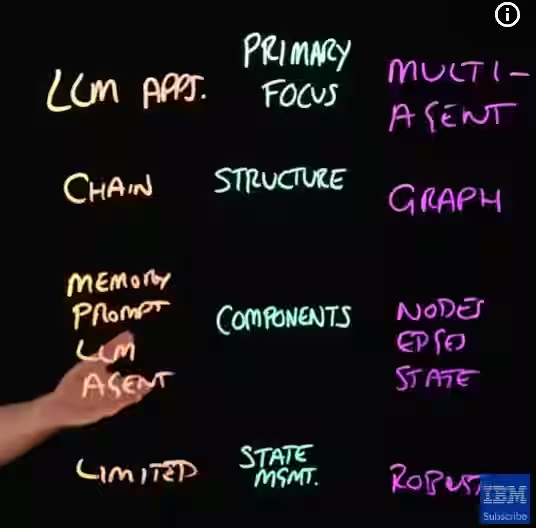
- Lower-level, more explicit
- You build a graph of states and nodes manually
- Focused on orchestrating how an agent runs over time using a low-level workflow engine
If you like “batteries included” and getting something working in 10 lines, start with LangChain. If you need a custom engine under the hood, reach for LangGraph.
4.2 Data and State Management
-
LangChain workflows
- Often treat each run as relatively stateless, aside from short-term context passed around a chain or stored in memory components.
- Good for:
- Question answering
- Simple “call model → maybe call tool → respond” loops
-
LangGraph
- Built specifically for stateful agents and stateful agent workflows.
- You define a state object (like
MessagesState) and LangGraph manages:- Short-term working memory (ongoing messages)
- Durable, persistent state across steps and even failures
- Ideal for:
- Multi-step processes
- Long-running tasks that may pause, resume, or be inspected
4.3 Control Flow and Structure
-
LangChain
- Chains and agents are often linear or lightly branched.
- Control flow is mostly:
- Defined in Python code
- Or baked into the agent logic (e.g., tool-calling loops)
-
LangGraph
- Uses explicit graphs:
- Nodes: functions or components that operate on state
- Edges: which node runs next
- Supports:
- Branching and loops
- Subgraphs (nested workflows)
- “Time travel” (replaying from past states)
- Behaves more like a general-purpose workflow engine for multi-step LLM orchestration.
- Uses explicit graphs:
… More How to Build Simple Multi-Agent
4.4 Durability and Long-Running Execution
-
LangChain workflows
- Great for short-lived operations:
- Respond to a user message
- Run a retrieval-augmented generation (RAG) query
- Execute a small sequence of tools
- You can add persistence, but it’s not the main focus.
- Great for short-lived operations:
-
LangGraph
- Designed for long-running, stateful workflows and agents:
- Can persist intermediate state to storage
- Can resume from failures without starting over
- Supports human-in-the-loop interactions (e.g., wait for approval, then continue)
- This kind of durable execution is crucial for long-running LLM workflows in production.
- Designed for long-running, stateful workflows and agents:
If you imagine a process that might take hours, days, or many user interactions, LangGraph is the more natural fit.
4.5 Relationship Between the Two
- LangGraph is built by the same company as LangChain and is part of the same ecosystem.
- LangChain agents are built on top of LangGraph:
- That’s how they gain durable execution, streaming, persistence, and more robust agent orchestration.
- You:
- Do not need to know LangGraph to use basic LangChain agents
- Can directly use LangGraph if you outgrow the abstractions LangChain provides
5. Step-by-Step Example / Workflow
Let’s walk through a simple scenario: a “support assistant” that:
- Receives a user question
- Checks a knowledge base
- If the answer is unclear, routes to a human
- Returns the resolution to the user
We’ll compare how this is conceptually done in each.
5.1 With LangChain Workflows
In LangChain, you might:
-
Define:
- An LLM model
- A retriever (knowledge base)
- Maybe a tool that sends emails or logs a ticket
-
Build a chain/agent:
- The agent first calls the retriever
- The model decides whether it can answer or should escalate
- If escalation is needed:
- Use a tool to notify a human (e.g., via Slack/email)
- Return a message like “I’ve escalated this issue”
-
Run it with something like:
result = agent.invoke({"messages": [...user question...]})
Notes:
- The process is mostly one-shot per request.
- Escalation is “fire and forget”; the agent doesn’t necessarily wait around for the human and then resume later without additional custom code.
This is a classic example of using LangChain workflows for fast, high-level agent development.
5.2 With LangGraph
In LangGraph, you’d build an explicit state graph:
-
Define a
Statethat includes:- Conversation history
- A
statusfield (e.g.,pending,waiting_for_human,resolved) - Maybe a
ticket_id
-
Create nodes:
route_request: decide whether to answer or escalateauto_answer: generate answer from knowledge baseescalate_to_human: create ticket, setstatus="waiting_for_human"wait_for_human: pause until a human updates the ticketsend_resolution: finalize the answer to the user
-
Connect them with edges:
START → route_request- If confident:
route_request → auto_answer → send_resolution → END - If not confident:
route_request → escalate_to_human → wait_for_human → send_resolution → END
-
The graph can:
- Persist the state when
status="waiting_for_human" - Be resumed later, when a human has added their input, picking up exactly where it left off.
- Persist the state when
This is more work to set up but gives you fine-grained control and persistence across a long-running, human-in-the-loop LLM system.
6. Real-World Use Cases
When LangChain Workflows Shine
- Chatbots and assistants with simple turn-based interactions
- RAG apps: “Ask questions over my documents”
- Tool-using agents that:
- Call APIs
- Perform simple actions
- Return results in one or a few steps
- Prototypes and MVPs where speed and simplicity matter most
- Teams who want to stay inside the LangChain expression language and avoid managing low-level orchestration themselves.
When LangGraph Is a Better Fit
- Multi-step business processes:
- Loan approval
- Onboarding workflows
- Compliance checks
- Long-running research or analysis agents:
- Gather data from multiple sources over time
- Periodically summarize and update reports
- Human-in-the-loop systems:
- Review required before sending emails
- Manual validation of certain actions
- Escalation flows in customer support
- Complex multi-agent systems:
- Different agents with specialized roles
- Coordinated via a shared state graph
- Any scenario requiring a dedicated agent orchestration framework that can run in production for many concurrent users. …. More How to Build LangGraph Content Pipeline
7. Best Practices
For LangChain Workflows:
- Start simple:
- Use built-in chains and
create_agentfor quick wins.
- Use built-in chains and
- Keep your chains short and focused:
- Single responsibility per chain or component.
- Use memory only when needed:
- Don’t overcomplicate with persistent memory for simple Q&A.
- Add observability:
- Integrate with tools like LangSmith for tracing and debugging.
For LangGraph:
- Design your state carefully:
- Include only what you genuinely need across steps.
- Keep nodes small and composable:
- One clear responsibility per node.
- Document your graph:
- Treat it like a workflow diagram your team can understand.
- Plan for failure/restart:
- Think about where you might need durable checkpoints.
- Use subgraphs:
- Break large workflows into smaller, reusable pieces.
- Consider how your stateful agent workflows will evolve as requirements grow.
8. Common Mistakes
Mistake 1: Jumping straight to LangGraph for a simple project
- Overkill for:
- A basic chatbot
- A single-page RAG demo
- Result:
- Extra complexity, slower development, harder onboarding
Fix: Start with LangChain workflows; move to LangGraph when you feel the pain of missing capabilities (durability, complex branching).
Mistake 2: Forcing “everything” into a single LangChain chain
- Long, tangled chains become hard to debug.
- Logic and state get mixed in one place.
Fix: Break flows into smaller chains or agents, or move complex orchestration logic into LangGraph.
Mistake 3: Ignoring state design in LangGraph
- Putting too much or too little into your state:
- Too much → hard to reason about, performance issues
- Too little → no way to resume or inspect correctly
Fix: Treat state as an explicit contract:
- Only include what’s needed across steps.
- Version it as your graph evolves.
Mistake 4: Assuming LangChain agents are “basic” because they’re high level
- In reality, they gain:
- Durable execution
- Streaming
- Human-in-the-loop
- Because they’re built on top of LangGraph.
Fix: Don’t dismiss LangChain agents; try them before hand-rolling your own graph.
Mistake 5: Ignoring human-in-the-loop needs until too late
- Retrofitting manual review steps can be painful.
- Without planned human checkpoints, risky actions may ship directly to users.
Fix: If you know you’ll need human approvals, consider a LangGraph-based design early so that human-in-the-loop LLM systems are modeled explicitly in your graph.
9. Summary / Final Thoughts
LangChain and LangGraph solve related but different problems:
-
LangChain workflows:
- High-level, beginner-friendly
- Great for quickly building LLM apps and agents
- Best for shorter, simpler, request/response-style interactions
- Ideal when you want to focus on business logic, not orchestration
-
LangGraph:
- Low-level, powerful orchestration framework
- Built for long-running, stateful, complex agent workflows
- Ideal when you need durability, controlled branching, and human-in-the-loop behavior
- Suited to building production-ready AI agents that must run reliably
A practical approach:
- Prototype in LangChain using chains and agents.
- As complexity and requirements grow, migrate orchestration logic into LangGraph.
- Continue to use LangChain components (models, tools, retrievers) inside your LangGraph nodes.
You don’t have to choose one forever; they’re meant to be used together as your application matures.
10. FAQs
1. Do I need LangGraph to use LangChain?
No. You can build many useful apps with LangChain alone. LangChain agents already use LangGraph under the hood, but you don’t need to understand LangGraph to benefit from them.
2. When should I switch from LangChain workflows to LangGraph?
Consider LangGraph when:
- Your flows span many steps or long durations
- You need durable state and resumability
- You require complex branching, loops, or human approval steps
3. Can I use LangChain and LangGraph together?
Yes. This is common. You might:
- Use LangChain for models, tools, and retrievers
- Use LangGraph to orchestrate the order and conditions under which they run
4. Is LangGraph only for “agents”?
No. It’s a general orchestration framework for any long-running, stateful workflow, whether or not you call it an “agent.”
5. Does LangGraph replace LangChain?
No. They’re complementary:
- LangChain focuses on components and quick agent/application construction.
- LangGraph focuses on low-level workflow and state orchestration.
6. Is LangGraph harder to learn than LangChain?
Typically yes:
- You need to think in terms of state graphs, nodes, and edges.
- It’s more flexible but requires a more careful design.
7. Can I build a production system with just LangChain workflows?
Yes, if:
- Your flows are relatively short
- You don’t need deep orchestration or long-running state
For more complex, mission-critical workflows, LangGraph can give you better control and reliability.
8. How does human-in-the-loop work differ between them?
- In LangChain, you usually add manual review steps in your application code around the chains/agents.
- In LangGraph, human-in-the-loop becomes part of the graph flow, with explicit nodes that pause execution until a human decision is made.
9. What’s the easiest way to start if I’m brand new?
Start with:
- A simple LangChain agent (
create_agent) - A few tools and a model
Once you hit limits—like needing complex branching or resumable, long-running flows—introduce LangGraph gradually.
Published by Kamrun Analytics Inc. Update: November 29, 2025